▢ Case study · 2026
StackPilot
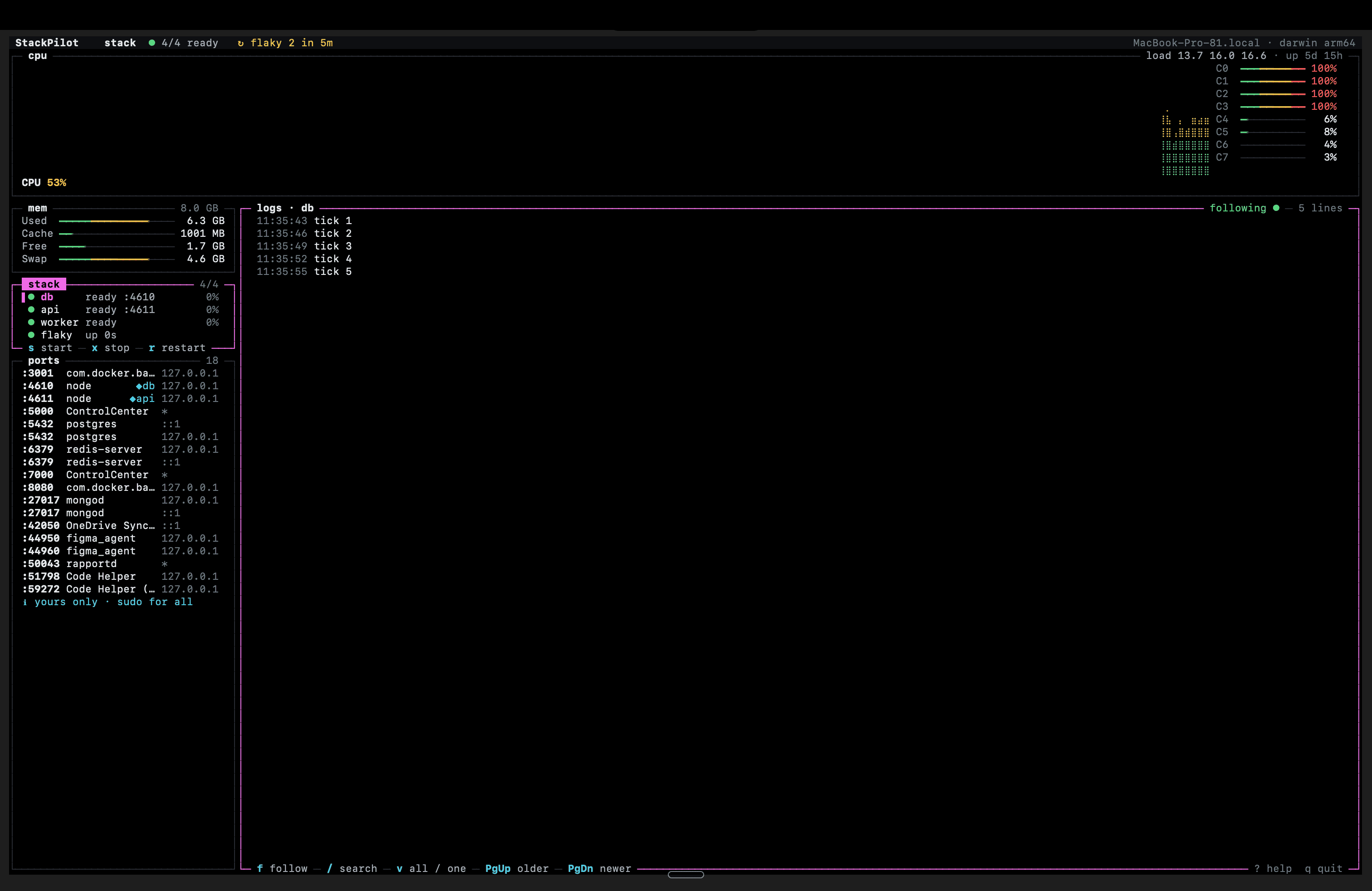
htop and pm2 in one terminal app. StackPilot monitors CPU, memory and ports, and runs, supervises and restarts your project’s processes from a single TUI. It ships as one binary for macOS and Linux.
- Role
- Solo developer and maintainer
- Year
- 2026
- Timeline
- Sep 2026
- Built with
- JavaScriptBunReactOpenTUIBun FFINode.jsnpmGitHub ActionsCodeQL
01
The problem
Running a project locally usually means a terminal tab per process: the API, the frontend, a worker, a database. A system monitor sits in another tab, and you run lsof -i :3000 whenever a port gets stuck.
A crash in one tab goes unnoticed. A memory leak only shows up once the machine starts swapping. System monitors like htop can’t tell which process belongs to your project, and process managers like pm2 don’t show the rest of the machine.
I wanted one screen that does both. It should be able to say “your api is the process holding 1.2 GB and climbing, and it’s listening on port 3000.”
02
What he built
StackPilot is a terminal app that combines a system monitor and a process manager.
See the machine
A CPU history graph and a gauge per core, plus memory and swap
Listening ports with the process that owns each
A process table or tree with filter, sort, details, kill and renice
Run your stack
Starts processes from
stackpilot.json, a Procfile or package.json scripts, in dependency orderWaits for each process to be ready, by port, HTTP URL or a log line
Restarts crashes with backoff, and stops everything cleanly on exit
A live logs panel per process (or all interleaved), with pause and search
CPU and memory summed over each process’s whole tree, so
npm run devincludes node, esbuild and everything it spawns
Commands: init writes a config from what the project already has, import pm2 converts a pm2 setup, doctor checks the machine and config, and update self-updates.
How it’s built. The interface is built with React and OpenTUI, and it runs on Bun. The UI only talks to a store and an actions layer, so the core engine doesn’t depend on the renderer. It compiles to one standalone binary with no runtime to install, and works over SSH, on a Raspberry Pi, and in 256-colour, 16-colour or no-colour terminals.
03
The hard parts
Shipping without a runtime. OpenTUI needs Bun 1.3+ or a very recent Node, which most machines don’t have. So I ship a compiled binary per platform (macOS and Linux, arm64 and x64), and the npm package is just a launcher that picks the right one. It needs no install scripts.
Fast, accurate sampling. On macOS, StackPilot reads process data natively through Bun’s FFI, calling libproc and Mach directly. On Linux, it reads /proc with just one file per process per tick, which keeps the monitor cheap enough to leave running.
A quiet screen that speaks up when it matters. The dashboard stays calm while everything is normal. A CAUTION or WARNING light comes on only for real trouble:
a process that keeps crashing
a failing data source
memory that has grown steadily for ten minutes, flagged as
▲ leak?
The leak hint is advisory only and never kills anything.
Safety. A tool that can kill processes has to be careful. Every kill and renice is confirmed in the core engine, not just the UI:
your own processes need one key
system processes need you to type the exact name
StackPilot itself and PID 1 are blocked
If StackPilot is hard-killed, the next start finds the processes it left running (verified by start time) and offers to stop them.
Accessible colour. Colour means one thing everywhere, and every status also has a glyph (● running, ↻ restarting, ✕ crashed), so nothing depends on colour alone.
A trustworthy release pipeline. Every release is built by GitHub Actions from a tagged commit. npm packages carry provenance, and release archives carry SHA256SUMS and GitHub build attestations. The curl installer and self-update both verify checksums. CI also runs CodeQL and the OpenSSF Scorecard.
04
How it turned out
StackPilot is published on npm as stackpilot-tui and installs with one command: npm install -g stackpilot-tui.
700+ downloads on npm
Two releases (0.1.0 and 0.1.1), each built and signed automatically
Four platform builds: macOS and Linux, on arm64 and x64
About 8K lines of code with 41 test files, including UI frame tests
Full open-source setup: contributing guide, code of conduct, security policy and release docs
This was my first tool used by people I don’t know. It taught me that packaging, safety checks and a trustworthy release process matter as much as the features.